Timz GMRS
click HERE to return to main repeater pageclick HERE for details on specific radio models
Adding Timz Repeater Channel
into your GMRS radio
Note: this info is about recently mfgrd GMRS radios; made after the FCC allowed repeaters... but clamped down on their overall frequency ranges. I am not covering older radios that are wide-open, or radios that have been modified (opened up). Those with older or modified radios probably won't need help with this specific task. Tim doesn't worry about which radio you are using to access the repeater, but you must have a valid GMRS license.
Of the multiple ways of accomplishing this, here are three:
1. Edit existing channel 27
or
2. Edit existing channel 19
or
3. Creating a totally new memory channel
Editing existing channel 27
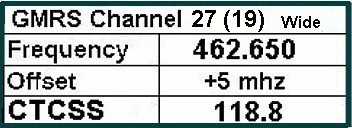
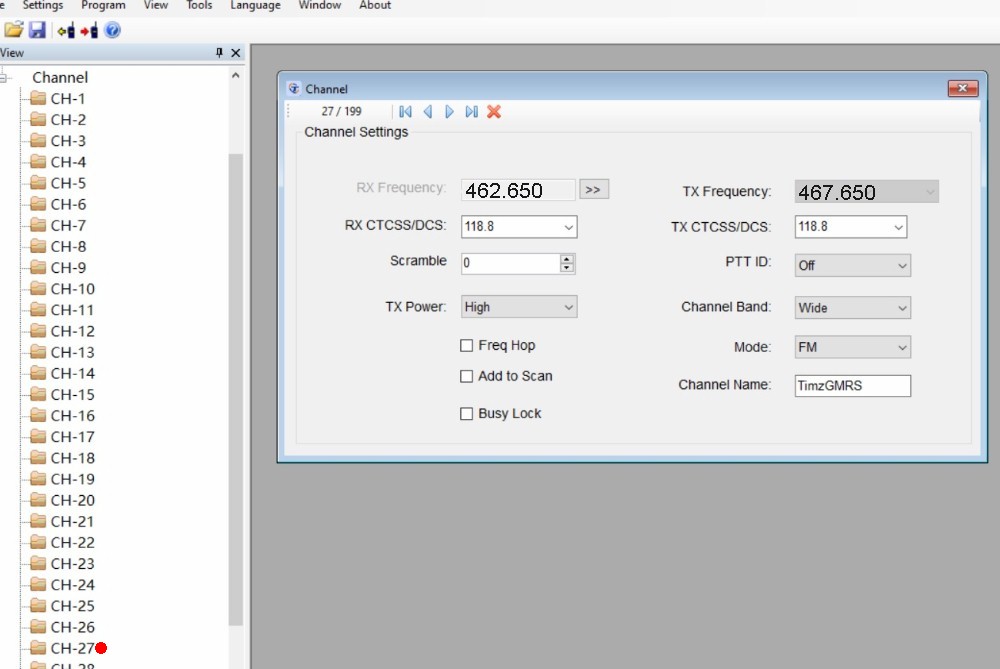
If your GMRS radio already has a channel 27, then all you need to is activate 118.8 CTCSS (for both RX and TX) on that existing channel. This can be accomplished via the radios front panel, or using the programming software (CPS). Below is an example of using the CPS:
Editing existing channel 19
If your GMRS radio does not have a channel 27, try to edit existing channel 19. You'll need to change the TX freq (to 467.650) and activate CTCSS (118.8) for both RX and TX. The RX frequency for this channel (462.650) does not change.Creating a totally new memory channel
If your particular radio won't allow editing of existing channels, then attempt to create a new memory channel... number 31 or higher.462.650 rx 118.8 ctcss
467.650 tx 118.8 ctcss
click HERE for details on specific radio models Interested in Amateur (ham) radio? Click HERE
Contact Tim
back to main repeater page